User Creation
Email Password Migration
SuperTokens allows you to import users with password hashes generated with BCrypt, Argon2 and Firebase SCrypt with our import user API.
You can find the API spec here.
Migrating users with Argon2 or BCrypt password hashes
For users with BCrypt or Argon2 password hashes you can use the following curl command to import your user.
curl --location --request POST '<CORE_API_ENDPOINT>/recipe/user/passwordhash/import' \
--config /run/secrets/supertokens-curl.conf \
--header 'Content-Type: application/json; charset=utf-8' \
--data-raw '{
    "email": "johndoe@example.com",
    "passwordHash": "$argon2d$v=19$m=12,t=3,p=1$NWd0eGp4ZW91b3IwMDAwMA$57jcfXF19MyiUXSjkVBpEQ"
}'Migrating users with Firebase SCrypt Password hashes
Importing users from Firebase requires an update to your SuperTokens Core configuration and formatting the input password hash.
Step 1: Retrieve your Firebase password hashing parameters from your dashboard.
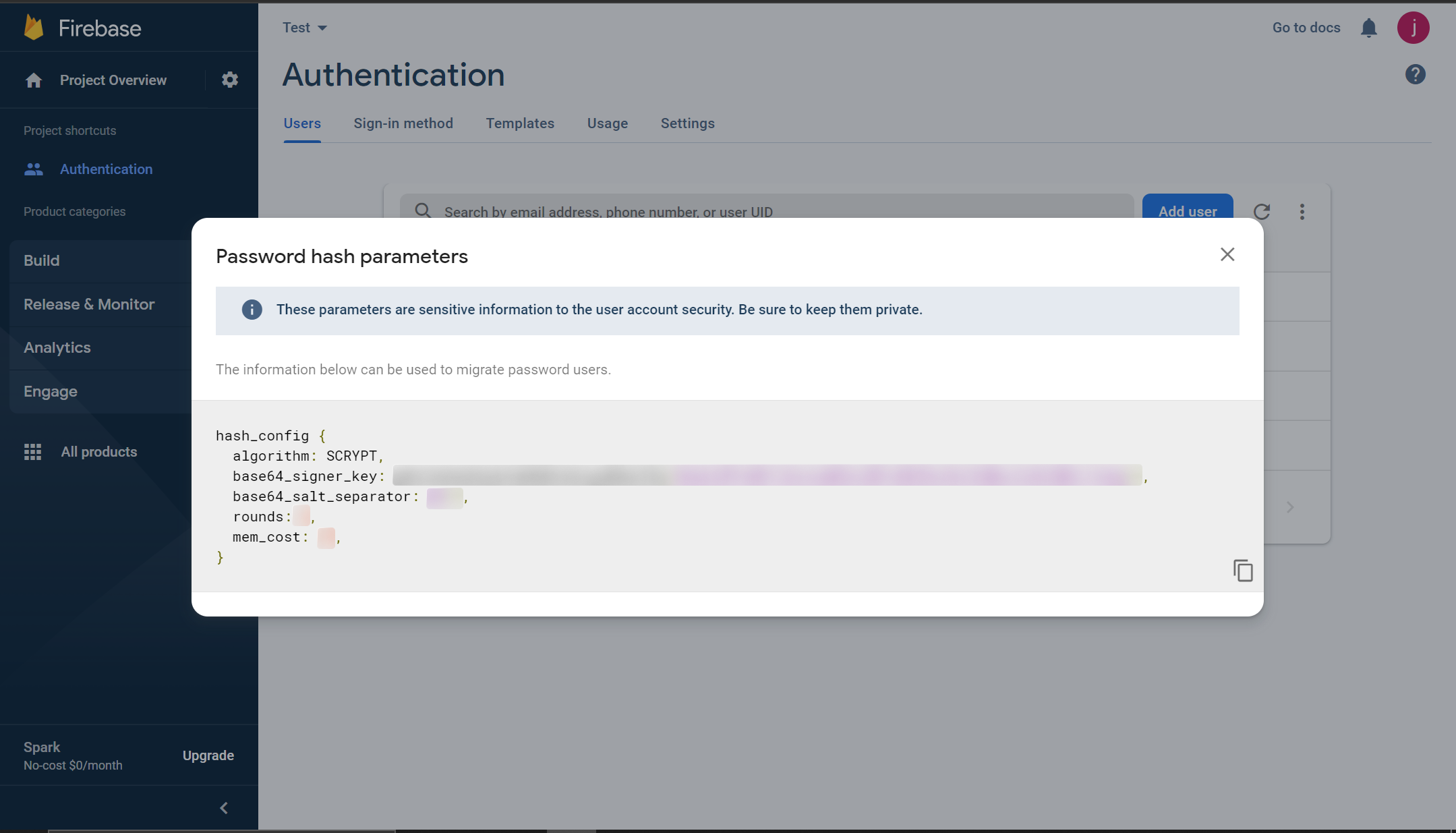
Step 2: Update the SuperTokens core to use the base64_signer_key
For Managed Service
- Edit the core configuration on the Configuration page of the relevant deployment in the SuperTokens SaaS Dashboard.
- Set the
firebase_password_hashing_signer_keyfield in the config to thebase64_signer_keyretrieved from your firebase hashing parameters.
With Docker: Create /run/secrets/supertokens-migration.environment with mode 0600. It must contain
API_KEYS=<GENERATED_API_KEY> and FIREBASE_PASSWORD_HASHING_SIGNER_KEY=<BASE64_SIGNER_KEY>. Use deployment-managed
secrets instead of an environment file where available.
Without Docker: Restrict the Core listener to a private or local-only interface with host firewall/network policy. The
exact process binding is deployment-specific; verify from another host that port 3567 is unreachable before importing.
docker run \
    --env-file /run/secrets/supertokens-migration.environment \
    -p 127.0.0.1:3567:3567 \
    -d supertokens/supertokens-<db_name>@sha256:<TESTED_IMAGE_DIGEST>
# Add your base64_signer_key to the following in the config.yaml file.
# The file path can be found by running the "supertokens --help" command
firebase_password_hashing_signer_key: "gRhC3eDeQOdyEn4bMd9c6kxguWVmcIVq/HbJKnCXdWscZx0l2WbCJ1wbg=="
api_keys: "<GENERATED_API_KEY>"Step 3: SuperTokens requires firebase password hashes to be in a specific format to be parsed.
For example:
Your exported firebase user has the following credentials:
{
  "users": [
    {
      "localId": "userId",
      "email": "johnDoe@example.com",
      "passwordHash": "9Y8ICWcqbzmI42DxV1jpyEjbrJPG8EQ6nI6oC32JYz+/dd7aEjI/R7jG9P5kYh8v9gyqFKaXMDzMg7eLCypbOA==",
      "salt": "/cj0jC1br5o4+w=="
    }
  ]
}
The memory cost, rounds and salt separator retrieved from the password hashing config are:
{
  "mem_cost": 14,
  "rounds": 8,
  "base64_salt_separator": "Bw=="
}
The password hash would be the following: $f_scrypt$9Y8ICWcqbzmI42DxV1jpyEjbrJPG8EQ6nI6oC32JYz+/dd7aEjI/R7jG9P5kYh8v9gyqFKaXMDzMg7eLCypbOA==$/cj0jC1br5o4+w==$m=14$r=8$s=Bw==
The example password hash is in the following format $f_scrypt$<passwordHash>$<salt>$m=<mem_cost>$r=<rounds>$s=<base64_salt_separator>
Step 4: Run the following curl command to import the user
curl --location --request POST '<CORE_API_ENDPOINT>/recipe/user/passwordhash/import' \
--config /run/secrets/supertokens-curl.conf \
--header 'Content-Type: application/json; charset=utf-8' \
--data-raw '{
  "email": "test@example.com",
  "passwordHash": "$f_scrypt$9Y8ICWcqbzmI42DxV1jpyEjbrJPG8EQ6nI6oC32JYz+/dd7aEjI/R7jG9P5kYh8v9gyqFKaXMDzMg7eLCypbOA==$/cj0jC1br5o4+w==$m=14$r=8$s=Bw==",
  "hashingAlgorithm": "firebase_scrypt"
}'
Passwordless Migration
This legacy procedure is an active passwordless authentication flow, not a side-effect-free import. Generating a code creates temporary passwordless device/code records with an expiry. Consuming the link code consumes that credential and performs passwordless sign-in/up, creating the user if necessary. Repeating or racing these requests can produce used, expired, or duplicate-flow errors. Run them only in a controlled migration process, keep returned codes secret, and reconcile the resulting user before retrying. Use bulk import for new migrations.
Generate passwordless code
With Email
curl --location --request POST '<CORE_API_ENDPOINT>/recipe/signinup/code' \
--config /run/secrets/supertokens-curl.conf \
--header 'Content-Type: application/json; charset=utf-8' \
--data-raw '{
    "email": "johndoe@example.com"
}'
With Phone Number
curl --location --request POST '<CORE_API_ENDPOINT>/recipe/signinup/code' \
--config /run/secrets/supertokens-curl.conf \
--header 'Content-Type: application/json; charset=utf-8' \
--data-raw '{
    "phoneNumber": "+14155552671"
}'
On successfully generating the passwordless code you should see the following response
{
  "status": "OK",
  "preAuthSessionId": "d3Zpa9eoyV2Wr7uN5DLr6H1clzbwwGTc_0wIIXJT55M=",
  "codeId": "4fe93f8e-a5da-4588-82e2-314c6993b345",
  "deviceId": "+cWm1Y2EFxEPyHM7CAwYyAdkakBeoEDm6IOGT3xfa1U=",
  "userInputCode": "463152",
  "linkCode": "UlEb3-gbIYow61ce6RNzghkGN8qcHkpRwbhHbvMEjxY=",
  "timeCreated": 1664283193059,
  "codeLifetime": 900000
}
Consume the passwordless code to create the passwordless user
Retrieve the preAuthSessionId and linkCode from the previous response and set them as request body parameters for the consume code request.
curl --location --request POST '<CORE_API_ENDPOINT>/recipe/signinup/code/consume' \
--config /run/secrets/supertokens-curl.conf \
--header 'Content-Type: application/json; charset=utf-8' \
--data-raw '{
    "preAuthSessionId": "d3Zpa9eoyV2Wr7uN5DLr6H1clzbwwGTc_0wIIXJT55M=",
    "linkCode": "UlEb3-gbIYow61ce6RNzghkGN8qcHkpRwbhHbvMEjxY="
}'
If the imported passwordless login method should have both an email address and phone number, use its returned user ID to add the missing contact information:
curl --location --request PUT '<CORE_API_ENDPOINT>/recipe/user' \
--config /run/secrets/supertokens-curl.conf \
--header 'rid: passwordless' \
--header 'Content-Type: application/json; charset=utf-8' \
--data-raw '{
  "userId": "fa7a0841-b533-4478-95533-0fde890c3483",
  "email": "johndoe@gmail.com",
  "phoneNumber": "+14155552671"
}'
ThirdParty Migration
To migrate users with social accounts we can simply call the SuperTokens Core’s signInUp API with the provider Id and the user’s third party userId.
For example:
If we were importing a user with Google as their provider with their third party userId being 106347997792363870000, we can run the following curl command to import the user.
curl --location --request POST '<CORE_API_ENDPOINT>/recipe/signinup' \
--config /run/secrets/supertokens-curl.conf \
--header 'Content-Type: application/json; charset=utf-8' \
--data-raw '{
  "thirdPartyId": "google",
  "thirdPartyUserId": "106347997792363870000",
  "email": {
    "id": "johndoe@gmail.com",
    "isVerified": true
  }
}'